
Scrape, crawl and extract on the same key as your models
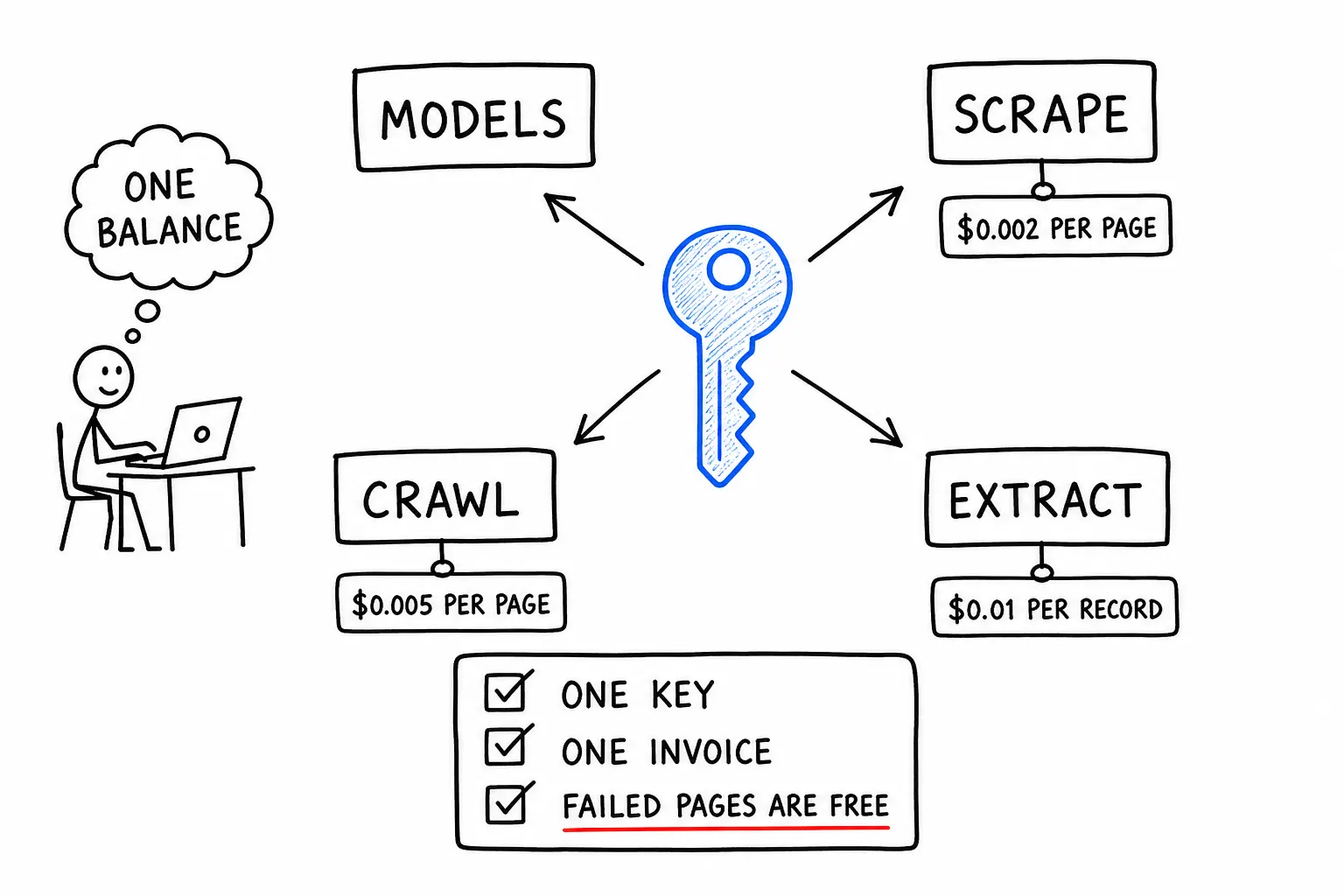
Most retrieval-augmented workloads are two vendors pretending to be one system. A scraping service fetches the page, a model provider reasons about it, and the developer holds two accounts, two credentials, two rate limits and two invoices for what is logically a single operation.
We put three web context endpoints on the same key and the same balance as the models. This article is what each one does, what it costs, and the specific cases where reaching for the wrong one wastes money.
Three endpoints, three different jobs
Scrape, when you know the URL
POST /v1/scrape takes one URL and returns its content. You choose the format:
curl -s https://api.apexapi.dev/v1/scrape \
  -H "Authorization: Bearer $APEXAPI_KEY" \
  -H 'Content-Type: application/json' \
  -d '{"url": "https://example.com/pricing", "format": "markdown"}'
Formats are markdown, html and text, defaulting to markdown, which is usually what you want since it is the format models read best and it strips the navigation cruft that wastes input tokens.
There are two fetch tiers. Standard is a plain fetch and handles most sites at $0.002 per page. Stealth handles anti-bot protection and JavaScript-rendered pages at $0.008 per page. You can set stealth to true, leave it false, or set it to "auto" and let the gateway decide.
The billing detail worth knowing: the request holds the worst-case stealth price against your balance and then charges the tier actually used. So an auto fetch that turns out to be a simple page costs $0.002 even though $0.008 was reserved while it ran. You are never billed the reservation.
Crawl, when you need the site
POST /v1/crawl starts from one URL, follows links and returns many pages. Same three formats.
curl -s https://api.apexapi.dev/v1/crawl \
  -H "Authorization: Bearer $APEXAPI_KEY" \
  -H 'Content-Type: application/json' \
  -d '{"url": "https://example.com/docs", "limit": 50, "format": "markdown"}'
$0.005 per successfully crawled page. Pages that fail or return nothing are not billed.
Every crawl carries a page limit. It defaults to 100 and is hard-capped at 500 per job. That is what makes the cost knowable in advance: the maximum a crawl can cost is limit × $0.005, so a 50-page crawl cannot exceed 25 cents no matter what the site does. Crawling is the operation most likely to surprise a budget, and a bounded worst case computed before the job starts is the reason it does not.
Crawling is asynchronous, since a large site takes time. You submit the job and poll for completion.
Extract, when you need fields and not prose
POST /v1/extract is different in kind from the other two. It does not return page content. It returns structured records from site types it knows about.
curl -s https://api.apexapi.dev/v1/extract \
  -H "Authorization: Bearer $APEXAPI_KEY" \
  -H 'Content-Type: application/json' \
  -d '{
    "scraper": "amazon-product",
    "input": {"url": "https://www.amazon.com/dp/B0EXAMPLE"},
    "limit": 10
  }'
$0.01 per record returned. Failed or empty extractions are free, and the worst case is again limit × $0.01. The limit defaults to 100 and caps at 1000.
The available scrapers are a fixed catalog covering ecommerce, business, local and real estate site types: Amazon products, Walmart products, Crunchbase companies, G2 products, Google Maps businesses and Zillow properties. You can list them and see the expected input shape for each:
curl -s https://api.apexapi.dev/v1/extract/scrapers \
  -H "Authorization: Bearer $APEXAPI_KEY"
Being clear about a limitation, because it is the first question people ask: this is not a general-purpose "give me a schema and extract anything" endpoint. It is a catalog of known site types with known output shapes. If your target is not in the catalog, the right pattern is scrape or crawl for the content and then run a model over it with a tool-shaped schema, which the structured output article covers.
The catalog is also deliberately restricted to non-personal data. That constraint is enforced by which datasets exist in the catalog rather than by a policy document, which is the only kind of enforcement that actually holds.
Choosing between them
The decision is three questions and takes about five seconds once you have seen it laid out.
Do you know the exact URL, and do you want one page? Scrape. $0.002, or $0.008 if the site fights back.
Do you need many pages from one site, and you do not have the list? Crawl. $0.005 per page delivered, bounded by your limit.
Is your target one of the known site types, and do you want fields rather than text? Extract. $0.01 per record, and it saves you the model call that would otherwise turn prose into fields.
The expensive mistake in both directions is worth naming. Crawling a site to reach one page you already had the URL for costs several times a scrape and takes much longer. And scraping a hundred URLs one at a time, when they all came from one site, is more requests, more code and more latency than one crawl.
What sharing the key actually changes
The prices above are the visible part. The part that changes how you build is the shared credential and the shared balance.
One credential in your secrets manager. A retrieval pipeline normally holds a scraping key and a model key, rotated separately, expiring separately, each with its own failure mode when it lapses. One key is one thing to rotate.
One spend number for the whole operation. "What did this feature cost" is answerable when the fetch and the inference land on the same ledger. When they land on two invoices from two vendors, on different billing days, attribution is a reconciliation exercise that nobody does.
One set of limits to configure. A key can carry a daily spend limit, a monthly spend limit and an expiry date, and those apply across models and web tools alike. A scheduled crawl that goes wrong stops at the same cap that protects your inference spend, without a second system to configure. The fields are in the authentication docs.
Per-call cost visibility on the same header. Every response, whether it generated tokens or fetched a page, carries its exact USD cost in the X-ApexApi-Cost header to eight decimal places. A retrieval-augmented request's true cost is the sum of two calls, and both report in the same place and the same unit.
Agents can use these directly
If you are building an agent rather than a pipeline, the same three endpoints are exposed as tools on the hosted MCP server: scrape_page, crawl_site and extract_structured, alongside check_job for polling the asynchronous ones.
That matters for a specific reason. An agent that can call models but cannot fetch a page needs a second credential in its environment, and handing an autonomous process a second long-lived secret is exactly the thing you want to avoid. Here the capability arrives on the credential it already has, inside the same spend cap.
The MCP integration reference has the full tool list, and how to build an AI agent that manages its own API keys covers the credential side of that argument in more depth.
Two habits that keep this cheap
Ask for markdown, not HTML. Markdown strips navigation, scripts and styling before the content reaches your model. On a typical content page that is a large reduction in input tokens, and since you are paying for those tokens on the very next call, the format choice is a cost decision rather than a formatting preference.
Set a real limit on every crawl. The default of 100 pages is a sensible ceiling, not a target. If you need the docs section, limit to the docs section. The bounded worst case only protects you if the bound reflects what you actually need.
Full parameter reference for each endpoint is in the scrape, crawl and extract docs. If you have a key already, the fastest way to see the shape of the output is to run the scrape command at the top of this article against a page you know.
Frequently asked questions
- What is the difference between scrape, crawl and extract?
- Scrape fetches one known URL and returns its content as markdown, HTML or text. Crawl starts from one URL, follows links and returns many pages from the same site. Extract targets a specific site type such as an Amazon product or a Google Maps business and returns structured fields rather than page text. Choose by whether you know the URL, need the whole site, or need fields instead of prose.
- How much does web scraping cost through an AI gateway?
- On ApexApi a standard page fetch is $0.002 and a stealth fetch, used for anti-bot or JavaScript-rendered sites, is $0.008. Crawling is $0.005 per successfully crawled page. Structured extraction is $0.01 per record returned. Failed or empty results are not billed on crawl and extract, so a job that returns nothing costs nothing.
- Why does it matter that web tools share a key with model calls?
- Because a retrieval-augmented request is one logical operation split across two vendors otherwise. Sharing a key means one credential in your secrets manager, one balance, one invoice and one spend number covering the fetch and the inference. It also means an agent that can call models can fetch context without being given a second credential.
- What stops a crawl from running up an unexpected bill?
- Three things. Every crawl carries a page limit, defaulting to 100 and capped at 500, so the worst case is bounded before the job starts. Pages that fail or return nothing are not billed. And the maximum possible cost is the limit multiplied by the per-page price, which you can compute before you press go.
- Can an AI agent use these tools directly?
- Yes. They are exposed as tools on the hosted MCP server, so an agent connected over MCP can fetch a page, crawl a site or run a structured extraction as tool calls, alongside listing models and checking its own balance. No separate scraping vendor and no second credential in the agent's environment.
Recommended
More posts
- How an AI agent funds and pays for its own API calls
Registration, balance and top-up as three HTTP calls instead of three web forms. The flow, the caps that keep it safe, and when a human is still required.
- Structured output across providers, and where it fails
JSON mode is three different guarantees wearing one name. What ports between providers, what gets silently ignored, and why you validate anyway.
- Video generation APIs compared by real cost per second
Veo, Seedance, Kling, Hailuo and Grok Imagine priced per second of output. A five-second clip runs from thirty cents to three dollars. Where the gap goes.
One API key for every AI model
Start free