
Video generation APIs compared by real cost per second
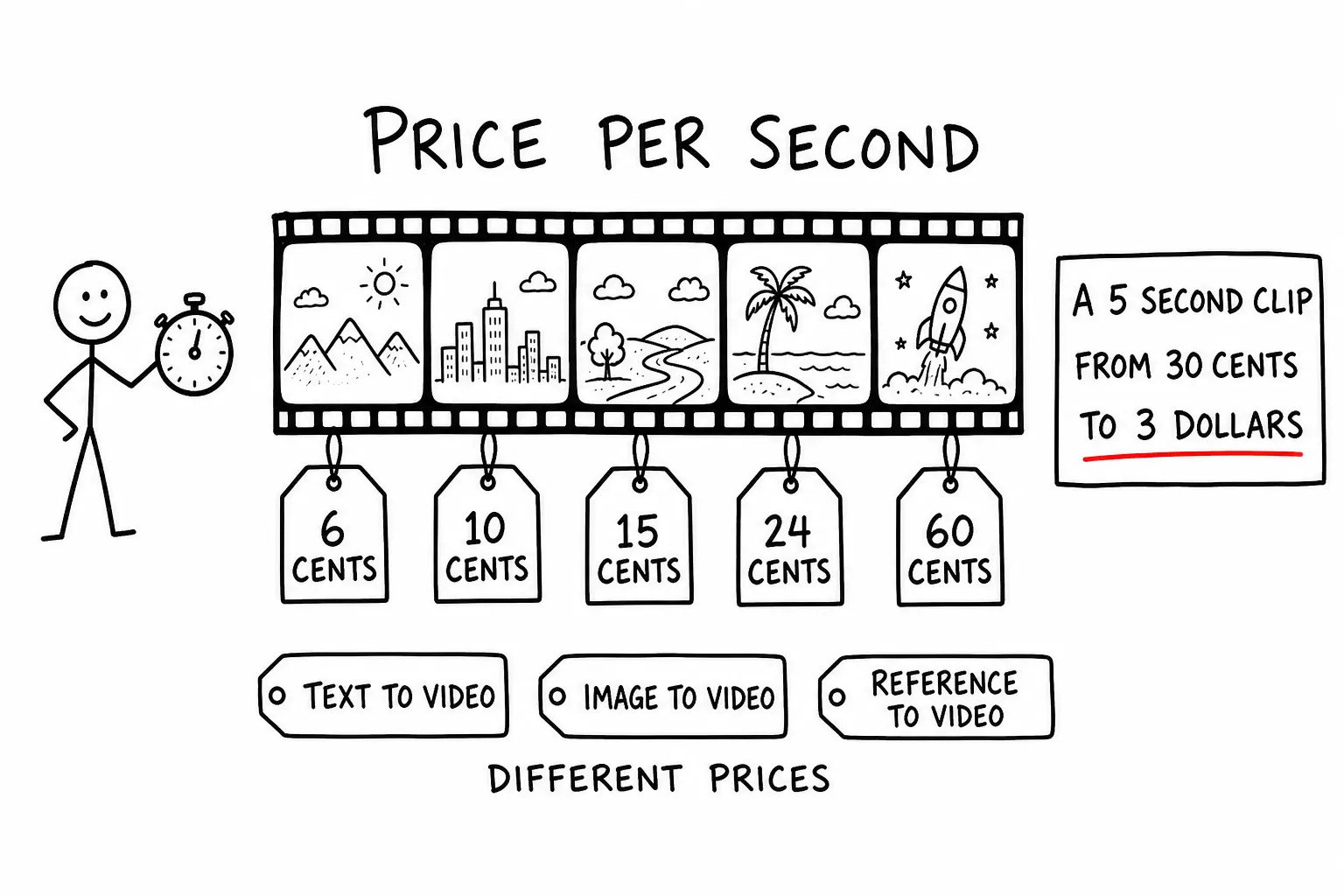
Generated video costs between about six cents and sixty cents per second of output. For a five-second clip, the common unit for social and background loops, that is thirty cents at the bottom and three dollars at the top.
Ten times, for the same nominal task. This article is where that gap goes, using prices from our live catalog on 6 August 2026, in dollars per second, on one balance. Not collected from six vendor pages in six different units.
The numbers
Where a model charges more for higher resolution or longer duration tiers, the figure is the entry price, which is what "from" means.
| Model | Maker | Price per second |
|---|---|---|
| Veo 3.1 Lite | from $0.06 | |
| Grok Imagine Video | xAI | from $0.084 |
| Hailuo 02 | MiniMax | $0.0996 |
| Kling v3 Standard, image to video | Kuaishou | from $0.101 |
| Veo 3.1 Fast | from $0.12 | |
| Kling v3 Pro | Kuaishou | from $0.134 |
| Seedance v1 Pro | ByteDance | $0.149 |
| Seedance 2.0 Mini | ByteDance | from $0.181 |
| Kling v3 Pro, motion control | Kuaishou | from $0.202 |
| Veo 3.1 | from $0.24 | |
| Seedance 2.0 Fast | ByteDance | from $0.29 |
| Kling v2 Master, text to video | Kuaishou | $0.336 |
| Seedance 2.0 | ByteDance | from $0.363 |
| Veo 3 | from $0.60 |
Two things are worth noticing before any argument about quality.
Duration is the dominant multiplier. Unlike image models, where the unit is one output, here the unit scales with length. A ten-second clip costs twice a five-second clip on every row. That makes budgeting simple and it makes duration the first lever to pull, ahead of model choice, because halving length saves more than moving down two rows in the table.
Within a family the spread is large. Veo runs from $0.06 to $0.60, a factor of ten inside one product line. Seedance 2.0 runs from $0.181 to $0.363. Saying "we use Veo" or "we use Seedance" does not describe your cost at all. The variant does.
The same model, different routes, different prices
This is the structural detail that surprises people coming from text APIs.
A video model is usually not one endpoint. It is a family of routes: text to video, image to video, reference to video, and in some cases motion control. Those are genuinely different capabilities, and they can carry different prices.
Kling v3 Pro is the clearest illustration. Text to video and image to video both sit around $0.134 per second. Motion control sits around $0.202. Same model generation, different route, roughly fifty percent more. If you prototype on text to video and ship on motion control, your forecast is wrong by that margin.
The Seedance 2.0 family shows the same pattern across a different axis. Mini, Fast and the full model each expose text, image and reference routes, and the tier you pick moves the price from $0.181 to $0.363 while the route you pick stays flat within a tier. So there are two independent dials, and both need to be fixed before a cost estimate means anything.
Practical rule: price the exact route you will ship, not the one that was convenient to test.
What the extra money buys
Three things separate the tiers, and only one of them is what people expect.
Motion coherence over time. This is the real differentiator and it is hard to see in a still frame. Cheap models produce a good first second and drift: objects change shape, backgrounds swim, a hand becomes a different hand. Expensive models hold a scene together across the clip. The longer your clip, the more this matters, which means the cheap tier degrades exactly where you are also paying more for duration.
Instruction adherence for camera and motion. "Slow dolly in, subject stationary" is followed at the top of the table and treated as a suggestion further down. If your prompts describe camera work, that is a hard requirement rather than a preference.
Whether audio comes with it. Some models return a finished clip with generated ambient sound. Others return silence. This changes your pipeline more than it changes your bill: a silent model means a separate audio service, a stitching step and a synchronization problem, all of which is engineering work that never appears in a per-second price comparison. If you are building an automated pipeline rather than producing clips by hand, a model that returns finished audio can be the cheaper option even at a higher headline rate.
What does not differ as much as the price suggests: single-frame image quality. Pull a still out of a cheap clip and it often looks fine. The gap is in what happens between frames.
Capability constraints that are not on the price list
Some routes have requirements that will fail your request regardless of budget, and they are not visible in a pricing table.
Motion control is the example we have hit directly. Kling's motion control route expects a human upper body in the source, because that is the subject it was built to drive. Feed it a landscape or an object and it does not produce a cheaper result, it produces a failed or nonsensical one. That is a capability boundary, not a quality difference, and no amount of prompt tuning moves it.
The general lesson: for video, test the specific route against your specific input type before pricing anything. Image models are broadly interchangeable in what they accept. Video routes are not.
Cost per usable clip, not cost per generation
The same discipline that applies to image generation applies harder here, because the failures are more expensive and more subtle.
A generation that comes back with drift in the last two seconds is not a usable clip, and you will not know until someone watches it. That is the acceptance problem: image rejects are visible in a grid at a glance, video rejects require playback. Which means a low acceptance rate costs both money and attention.
The unit worth tracking is cost per clip you actually ship. Run your real prompts, count generations, count keepers, divide. On a workload where the cheap tier lands one in four and the mid tier lands three in four, the mid tier is cheaper despite the higher rate, and the difference in review time is larger than the difference in spend.
Two numbers that belong in that calculation and usually get left out. Duration inflation, where a five-second target becomes eight seconds because the first three are unusable, silently increases cost by more than half. And review time, which for video is real-time by definition, since somebody has to watch it.
Keeping an unattended pipeline from surprising you
Video is where automated pipelines get expensive fastest, because the unit cost is two orders of magnitude above a text call and the failure loops look the same.
A scheduled job that retries on a transient error can generate a lot of seconds in an hour. The protection is not a better prompt, it is a limit. Use a separate API key for anything running unattended and put a daily spend limit on it, plus a model allowlist so an accidental switch to a premium route cannot happen. Those fields are per key and are described in the authentication docs.
For measurement rather than protection, every response carries its exact cost in USD in the X-ApexApi-Cost header, to eight decimal places. On a per-second-priced workload that is the difference between knowing what a pipeline costs per run and estimating it from clip lengths you did not verify.
Check the price before you commit
Every number here will drift, and video pricing moves faster than text pricing because the underlying compute is still getting cheaper. Read the catalog rather than the article:
curl -s https://api.apexapi.dev/v1/models \
  -H "Authorization: Bearer $APEXAPI_KEY" \
  | jq '.data[] | select(.type == "video") | {id, pricing: .pricing.display}'
That returns the live per-second price for every video model and every route, in dollars. The catalog is the source of truth and this article is a snapshot of it. The video generation page groups the models by what they are good at, and the pricing page explains how billing works.
The short version
Fix duration first, because it multiplies everything else. Fix the route second, because text to video, image to video and motion control are not the same product and are not always the same price. Only then choose a model.
Then measure cost per usable clip on your own prompts. On video the acceptance rate varies more between models than the price does, and it is the number that decides your real bill.
Frequently asked questions
- How much does AI video generation cost per second?
- Between about six cents and sixty cents per second of output in August 2026, which puts a five-second clip somewhere between thirty cents and three dollars. Veo 3.1 Lite is currently the cheapest entry at $0.06 per second, Grok Imagine sits near $0.084, MiniMax Hailuo 02 near $0.0996, the Seedance and Kling families occupy the middle, and Veo 3 sits at the top at $0.60.
- Why is video priced per second instead of per clip?
- Because generation cost scales with duration rather than with the request. That makes budgeting straightforward, multiply the per-second price by clip length, but it also means duration is the single biggest lever on your bill. Doubling clip length doubles the cost, which is not true of resolution on most image models.
- Does the same video model cost the same for text-to-video and image-to-video?
- Not always. Several families expose separate routes for text-to-video, image-to-video, reference-to-video and motion control, and the routes can carry different prices. Kling v3 Pro image-to-video and text-to-video are both around $0.134 per second while its motion control route is around $0.202, so the capability you pick changes the rate, not just the input.
- Which video models generate sound as well as picture?
- Some do and some do not, and it changes the shape of your pipeline more than the price does. A model that returns a finished clip with ambient audio removes a separate audio service and a stitching step. A silent model means you are assembling sound elsewhere, which is engineering work that rarely appears in a cost comparison.
- How do I keep video generation costs predictable?
- Fix duration first, since it multiplies everything. Generate at the shortest length that works and extend only when a clip earns it. Then use a separate API key with a daily spend limit for anything running unattended, because a scheduled job that loops on a failure can spend far more in an hour on video than on text.
Recommended
More posts
- How an AI agent funds and pays for its own API calls
Registration, balance and top-up as three HTTP calls instead of three web forms. The flow, the caps that keep it safe, and when a human is still required.
- Scrape, crawl and extract on the same key as your models
Three web context endpoints on the balance that already pays for inference. What each one costs, when to reach for which, and what you stop maintaining.
- Structured output across providers, and where it fails
JSON mode is three different guarantees wearing one name. What ports between providers, what gets silently ignored, and why you validate anyway.
One API key for every AI model
Start free