
How to connect Cline to every model with one API key
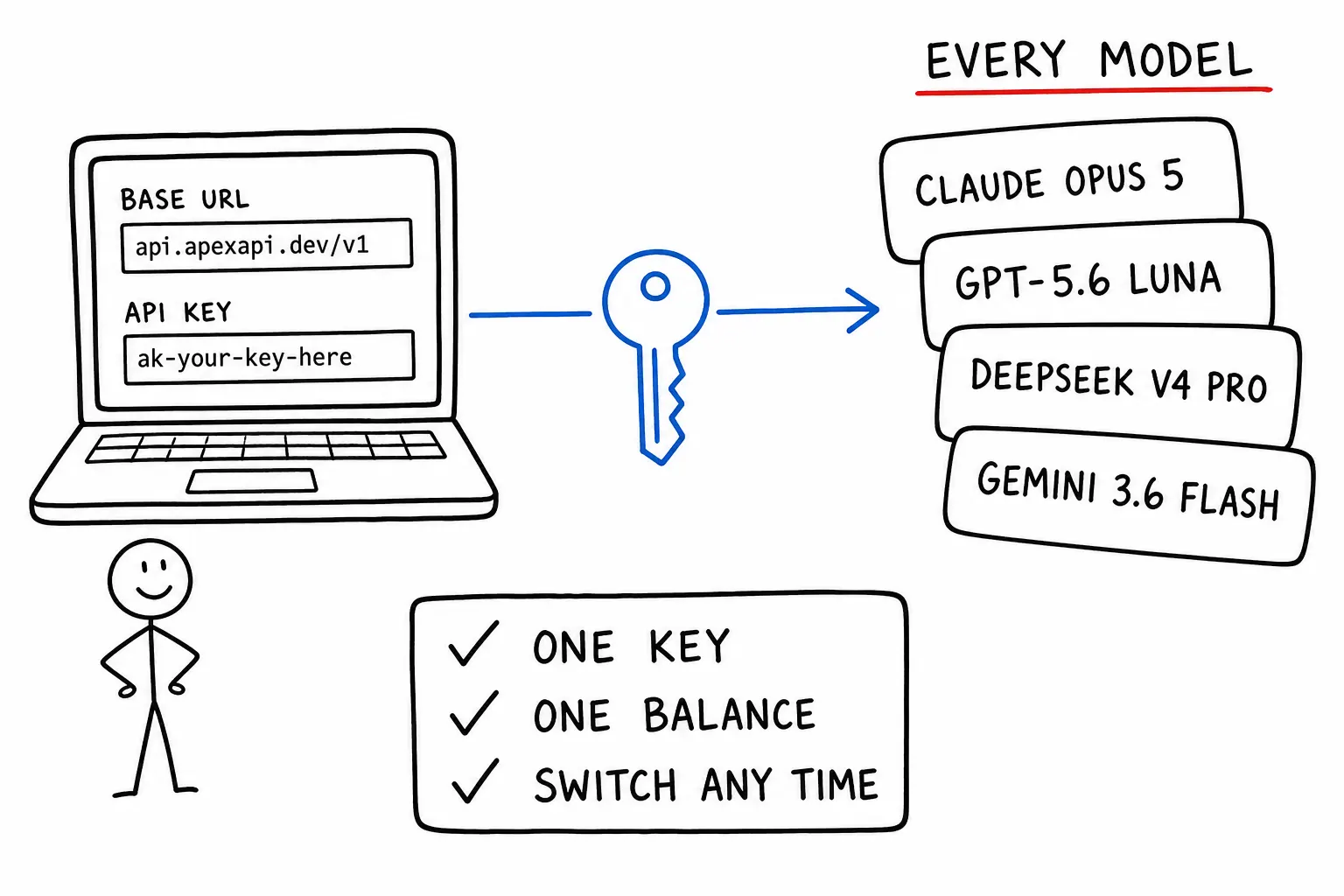
Cline talks to one provider at a time, and configuring providers one at a time is the part that gets tedious. Point it at an OpenAI-compatible gateway instead and every model in the catalog becomes a string you type into a settings field. No second account, no second credential, no second invoice.
The setup is two fields. The rest of this article is the three things people get wrong afterwards, and what to do with the flexibility once you have it.
The setup
1. Open Cline's settings using the gear icon in the Cline panel, and select OpenAI Compatible as the API provider. This is the option that lets you supply your own endpoint. Cline has named provider entries too, but those are the ones that lock you to a single vendor.
2. Fill in the two connection fields:
Base URL:  https://api.apexapi.dev/v1
API Key:   ak-your-key-here
3. Type the model ID. IDs are maker/model, naming whoever created the model:
anthropic/claude-opus-5
openai/gpt-5.6-luna
deepseek/deepseek-v4-pro
That is the whole integration. Cline appends /chat/completions to the base URL itself and sends the model string through unchanged.
If you do not have a key yet, the quickstart covers creating one, and the Cline docs page has the same steps with screenshots.
The three things people get wrong
The base URL
Two failure modes, both common. Including /chat/completions in the base URL produces a 404, because Cline appends it and you end up requesting the path twice. Omitting the /v1 segment produces a 404 for the same reason in reverse.
The rule is that the base URL ends at /v1, with no trailing slash and nothing after it. Everything past that is Cline's job.
The model ID
The ID has to match the catalog exactly. anthropic/claude-opus-5 works, claude-opus-5 does not, and neither does anthropic/claude-5-opus. A near miss returns a model_not_found error rather than silently falling back to something similar, which is the correct behavior but does mean a typo looks like an outage.
The safest way to get an ID is to read it rather than type it from memory:
curl -s https://api.apexapi.dev/v1/models \
  -H "Authorization: Bearer $APEXAPI_KEY" \
  | jq -r '.data[] | select(.type == "chat") | .id'
That prints every chat model ID you can paste straight into Cline. The full catalog is also browsable on the models page.
A subtlety worth knowing: the maker in the slug is who created the model, never who delivers it. A model reachable through two different infrastructure rails still has one ID, because the routing is the gateway's problem rather than something your editor should encode. When a model is renamed the old ID is kept as an alias, so a settings file from months ago keeps working.
Model Configuration, which is not cosmetic
Cline's Model Configuration section lets you set the context window, max output tokens, image support and per-token pricing for the model you selected. Under a named provider Cline fills these in for you. Under OpenAI Compatible it cannot, because a generic endpoint could be serving anything.
Getting these wrong has real consequences. Set the context window too high and Cline packs a request the model will reject. Set max output tokens too low and long diffs get truncated mid-file, which looks like the model failing at the task rather than a setting cutting it off. Set the pricing fields wrong and Cline's running cost estimate is fiction.
The correct values are in the catalog. For any model, GET /v1/models returns context_length and max_output_tokens alongside the pricing, which is exactly the set of numbers those fields want:
curl -s https://api.apexapi.dev/v1/models \
  -H "Authorization: Bearer $APEXAPI_KEY" \
  | jq '.data[] | select(.id == "anthropic/claude-opus-5")
        | {context_length, max_output_tokens, pricing: .pricing.display}'
One caveat that catches people on long refactors. Not every model in the catalog publishes a max output token figure. Where it is absent the gateway applies a conservative fallback cap rather than letting the request run unbounded, which protects you from a runaway bill but also means a model without a published figure is a poor choice for a task that emits a large diff in one response. If Cline keeps truncating, check that field before changing your prompt.
Not every model can drive a coding agent
A coding agent is a tool-calling loop. It reads files, writes files and runs commands through tool calls, so a model without tool support cannot drive it regardless of how good the model is at code.
Most of the catalog supports tools. Four chat models currently do not: google/gemini-3.5-flash-lite, google/gemini-2.5-flash-image, openai/gpt-4o-mini-search-preview and openai/gpt-4o-search-preview. Point Cline at one of those and you get prose describing what it would do instead of a tool call doing it. There is no HTTP error, because the request succeeded, so this reads as the agent ignoring instructions rather than as a misconfiguration.
Check before you debug the prompt:
curl -s https://api.apexapi.dev/v1/models \
  -H "Authorization: Bearer $APEXAPI_KEY" \
  | jq -r '.data[] | select(.type == "chat" and .capabilities.tools == false) | .id'
Vision is worth checking the same way if you paste screenshots into Cline, since a majority of chat models support images but not all of them.
What the one-key setup is actually for
Getting connected is the boring half. The reason to route an agent through a gateway is what it lets you do afterwards.
Switch models mid-task without re-authenticating. The model is a settings field, not a property of the session. Plan an approach with a strong model, switch to something cheap for the mechanical edits it produced, switch back for review. Every switch runs on the same key and the same balance, so there is no credential step between them, which is the friction that normally stops people doing this even when they know they should.
The economics are not marginal. Output prices for tool-capable models with large context windows currently run from about $0.34 per million output tokens at the bottom to $36 per million at the top. That is a hundredfold spread. Coding agents are output-heavy, since a diff is generated text, so output price is the number that dominates your bill rather than input price.
See what a task cost, not what it might have cost. Every response carries its exact cost in USD in the X-ApexApi-Cost header, to eight decimal places, including on streaming responses. Cline's own estimate depends on you having filled in the pricing fields correctly. The header does not.
Cap the damage from a loop that will not converge. An agent that keeps retrying a failing edit can burn a lot of tokens before anyone notices. A key can carry its own daily spend limit, monthly spend limit, model allowlist and expiry date, so the sensible pattern is a dedicated key for your editor with a daily cap on it. If the loop runs away, it stops at the cap instead of at your monthly budget. The fields are in the authentication docs, and the broader approach is in how to control AI API costs across your team.
The allowlist has a second use worth mentioning: it prevents an accidental switch to an expensive model from being expensive. If your editor key only permits three cheap models, typing the wrong ID fails closed rather than billing you.
The same setup works for the rest of them
Nothing above is specific to Cline. Any tool with an OpenAI Compatible provider option takes the same base URL and key, and the only thing that changes is where the settings live. We keep per-tool pages for Cursor, Continue, Codex CLI, GitHub Copilot, Kilo Code, Kimi Code, Crush, Hermes, OpenClaw, OpenCode and Pi, each with the exact fields for that tool.
Which means the setup cost of trying a different editor is roughly zero once you have a key, and so is the setup cost of trying a different model in the editor you already use. That is the actual point of the arrangement, and it is worth using rather than configuring once and forgetting.
If something does not work
Four checks, in order, and they cover almost everything.
Base URL ends at /v1. No trailing slash, no /chat/completions.
Model ID matches the catalog exactly. Read it from GET /v1/models rather than typing it.
The model supports tools. Four chat models do not, and the symptom is prose instead of action.
The key permits that model. If a key carries a model allowlist, a valid ID that is not on the list is refused. This is deliberate scoping, not a bug, and it explains a model that works with one key and fails with another.
If all four pass and it still misbehaves, the errors reference maps each error code to a cause.
Frequently asked questions
- How do I connect Cline to multiple AI providers?
- Point Cline at one OpenAI-compatible gateway instead of configuring providers one at a time. In Cline settings choose the OpenAI Compatible provider, set the base URL to https://api.apexapi.dev/v1, paste an ak- key, and type the model ID you want. Every model in the catalog then becomes selectable by changing that one string, with no additional accounts or credentials.
- What base URL and API key does Cline need?
- Base URL is https://api.apexapi.dev/v1 and the API key is your ak- key. Those are the only two connection fields. Cline appends /chat/completions itself, so do not include that in the base URL, and do not omit the /v1 segment.
- Why does my model not appear or return an error in Cline?
- The most common cause is a model ID that does not match the catalog exactly. IDs are maker/model, for example anthropic/claude-opus-5, and a typo produces a model_not_found error rather than a fallback. Check the exact string with GET /v1/models. The second most common cause is a key with a model allowlist that excludes the model you typed.
- Which models actually work with a coding agent?
- Any model that supports tool calling, which is most but not all of the catalog. Four chat models currently do not advertise tool support, and a coding agent pointed at one of those will produce prose where it should produce a tool call. The failure looks like the agent ignoring you rather than an error, so check the capability before blaming the prompt.
- Can I switch models in the middle of a task?
- Yes. The model is a field in Cline settings, not a property of the session, so you can plan with an expensive model, switch to a cheap one for mechanical edits, and switch back. Because everything runs on one key and one balance there is no re-authentication step between switches.
Recommended
More posts
- How an AI agent funds and pays for its own API calls
Registration, balance and top-up as three HTTP calls instead of three web forms. The flow, the caps that keep it safe, and when a human is still required.
- Scrape, crawl and extract on the same key as your models
Three web context endpoints on the balance that already pays for inference. What each one costs, when to reach for which, and what you stop maintaining.
- Structured output across providers, and where it fails
JSON mode is three different guarantees wearing one name. What ports between providers, what gets silently ignored, and why you validate anyway.
One API key for every AI model
Start free