
GPT Image 2.5 is live on ApexApi: Sunburst and Flare, five quality levels, one key

OpenAI released GPT Image 2.5 on September 8, and both API models are now live on ApexApi:
Same key, same endpoint as GPT Image 2. If you already generate images through us, switching is a one-string change. Both models are also in the model picker on the dashboard's Images page, with the new quality levels and the price of each one shown before you click generate.
What OpenAI changed
OpenAI's announcement covers the ChatGPT side too. These are the parts that matter if you call the API:
Better reference fidelity. When you pass reference photos, subjects stay more recognizable, and lighting and textures look more natural. OpenAI calls out reference-led workflows, where every variation has to stay anchored to the original.
Precision editing. The model is better at changing only what you asked for and leaving the rest alone. That is the difference between "swap the product in this ad" and "regenerate the whole ad and hope."
Consistency across edits. Over several rounds of changes, earlier edits are more likely to hold, and quality does not wear down with each pass.
Harder briefs. More accurate real-world content, more complex layouts (transparent backgrounds included), and closer adherence to a requested style.
Speed. OpenAI says generation latency is down by up to 50% compared with Images 2.0, and that Flare produces higher-quality images than GPT Image 2 at 50% lower latency.
Early customers named in the launch include Higgsfield, Adobe, Manus and Runway. Higgsfield's head of product summed up the editing change: Flare "understands what not to change."
On safety, OpenAI continues to attach C2PA metadata and invisible watermarking to generated images.
Sunburst or Flare?
- Flare is OpenAI's default recommendation for most applications: creator and social content, product experiences, prototyping, high-volume generation.
- Sunburst is built for premium work that needs tighter control across edits, such as campaign creative or polished product imagery. It takes longer to generate.
Here is Sunburst on a precise edit. The reference on the left is a Flare image from our own smoke test. The prompt asked for a green apple and nothing else:
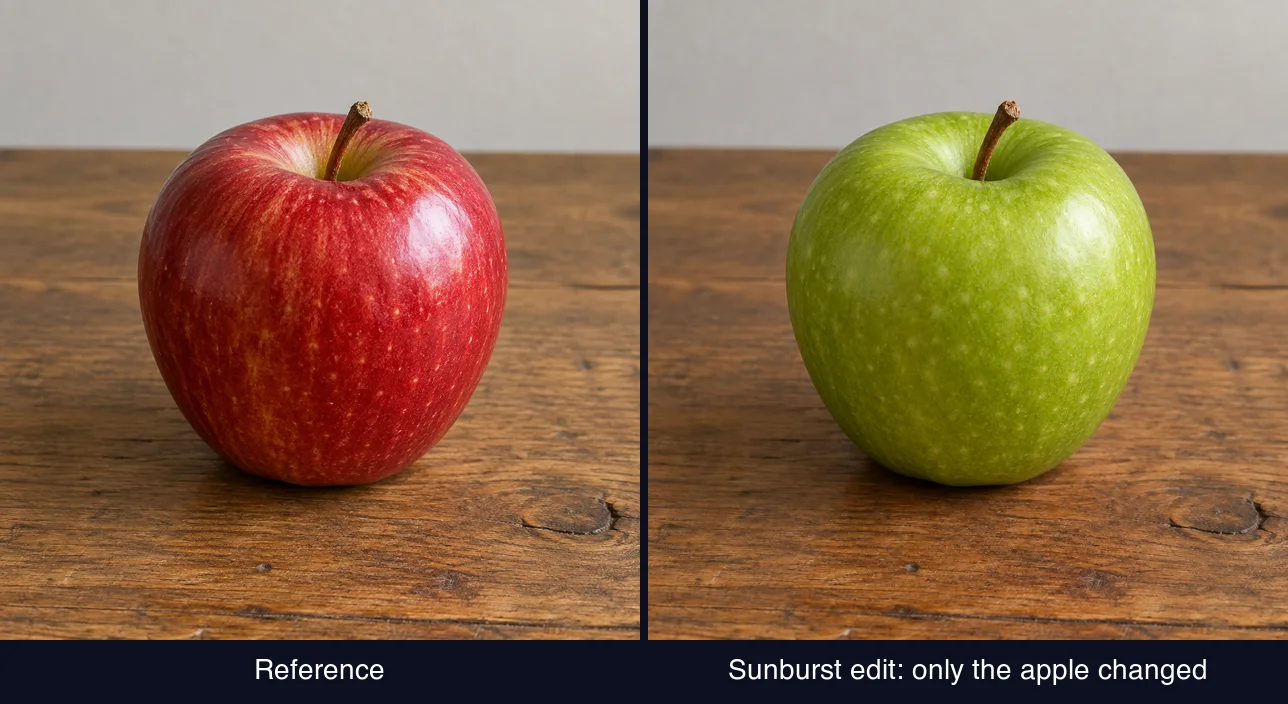
The table grain, the knot in the wood, the shadow and the framing all carry over. Only the apple changed.
Five quality levels, and what each one costs
GPT Image 2.5 adds two quality settings above high: xhigh and max. We ran the same prompt through Flare at every level. Each tile shows the all-in price we charged for it:
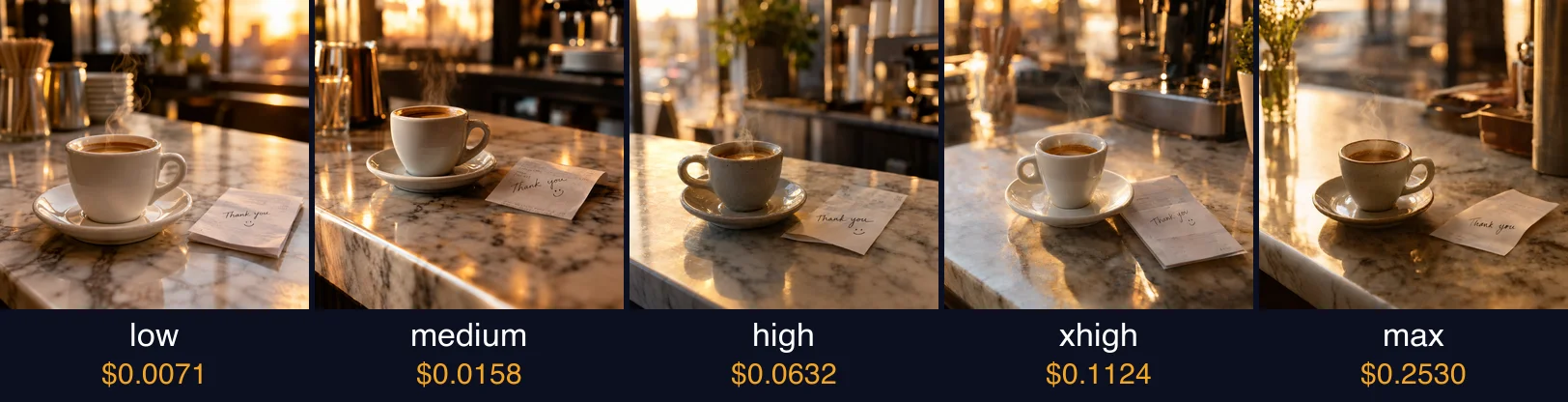
OpenAI prices GPT Image by tokens: $30 per million image output tokens, the same rate as GPT Image 2. We measured how many output tokens each level uses, so the table below shows the real price per image:
| Quality | Output tokens (1024x1024) | ApexApi price per image, all-in |
|---|---|---|
low | 196 | $0.0071 |
medium | 439 | $0.0158 |
high | 1,756 | $0.0632 |
xhigh | 3,122 | $0.1124 |
max | 7,024 | $0.2530 |
A few things we found while measuring:
- Sunburst and Flare use exactly the same token counts, so they cost the same at every level. You pick between them for output, not price.
- Landscape and portrait are cheaper than square. At 1536x1024 or 1024x1536,
highuses 1,372 tokens instead of 1,756. - The ladder moved. GPT Image 2.5
highuses the same tokens as GPT Image 2medium, andmaxmatches GPT Image 2high. According to OpenAI, you get a better image for the same spend. The newmediumsits much lower, at 439 tokens.
Edits cost a little more. OpenAI also bills input tokens, and so do we: each reference image uses between 256 and 1,536 tokens depending on its size, at $8 per million, and prompt text is $5 per million. Both are billed for each image you generate. We charge what OpenAI reports for the call, plus our service fee. A 1024x1024 reference adds about one cent.
The live prices are always on the Flare and Sunburst model pages, read from the same table that bills you.
Switching takes one string
curl https://api.apexapi.dev/v1/images/generations \
  -H "Authorization: Bearer ak-your-key" \
  -H "Content-Type: application/json" \
  -d '{
    "model": "openai/gpt-image-2.5-flare",
    "prompt": "A ceramic espresso cup on a marble cafe counter at golden hour",
    "quality": "high",
    "size": "1536x1024"
  }'
To edit, add your reference images and switch the model if you want Sunburst:
curl https://api.apexapi.dev/v1/images/generations \
  -H "Authorization: Bearer ak-your-key" \
  -H "Content-Type: application/json" \
  -d '{
    "model": "openai/gpt-image-2.5-sunburst",
    "prompt": "Change only the apple so it is a green apple. Keep everything else the same.",
    "quality": "medium",
    "image_urls": ["https://example.com/your-photo.png"]
  }'
Up to 10 reference images per request. The response carries a hosted image URL, and the X-ApexApi-Cost header tells you exactly what the call cost. The same model strings work from the OpenAI SDK, n8n and the ApexApi MCP server.
Try it
- Model pages: GPT Image 2.5 Flare and GPT Image 2.5 Sunburst
- In the dashboard: open Images with GPT Image 2.5 selected, choose a quality level and generate
- Prompting tips: our GPT Image 2 prompting guide applies to 2.5 as well
- Full catalog: apexapi.dev/models, 143 models behind one key
- New here? Create a key, buy credits, pay only for what you generate.
Every image in this post came from GPT Image 2.5 through our own gateway, including the header.
Frequently asked questions
- How do I use GPT Image 2.5 on ApexApi?
- Send a POST to https://api.apexapi.dev/v1/images/generations with your ak- key and set model to openai/gpt-image-2.5-flare or openai/gpt-image-2.5-sunburst. In the dashboard, both models are in the model picker on the Images page.
- What is the difference between Sunburst and Flare?
- OpenAI positions Flare as the default for most applications: better images than GPT Image 2 with lower latency. Sunburst is for premium work where edits need tighter control, and it takes longer to generate. On ApexApi both cost the same per image at every quality level.
- How much does GPT Image 2.5 cost on ApexApi?
- Per image at 1024x1024, all-in: low $0.0071, medium $0.0158, high $0.0632, xhigh $0.1124, max $0.2530. Landscape and portrait sizes use fewer tokens than square. For edits, each reference image and the prompt text are billed at OpenAI's input token rates plus our service fee.
- What are the xhigh and max quality levels?
- Two quality settings that only the GPT Image 2.5 models accept. They spend more output tokens per image for finer detail. On GPT Image 2 the highest setting is still high.
- Which sizes are supported?
- 1024x1024, 1536x1024 and 1024x1536. If you send another size, ApexApi maps it to the closest of those three by orientation.
Recommended
More posts
- Claude Opus 5 is live on ApexApi: Anthropic's best coding model, same price as Opus 4.8
Anthropic shipped Claude Opus 5 on July 24 and it's already in the ApexApi catalog: anthropic/claude-opus-5, 1M context, 128K output, $6/M input and $30/M output all-in. That's the same price as Opus 4.8. Here's what's actually new and how to switch in one string.
- Images and Videos are live: Veo, Kling, Seedance, Nano Banana and more — one key, real prices
ApexApi now ships full image and video generation: 29 image models and 26 video models behind one API key, with a visual studio in the dashboard, reference images, first/last frames, and the exact USD price shown before you generate.
- Generate images in n8n with GPT Image 2 (free webhook template)
Import a free n8n template that turns a prompt into a GPT Image 2 image over a webhook. Three nodes, one key, reusable as a sub-workflow or an API.
One API key for every AI model
Start free